Case details and upload
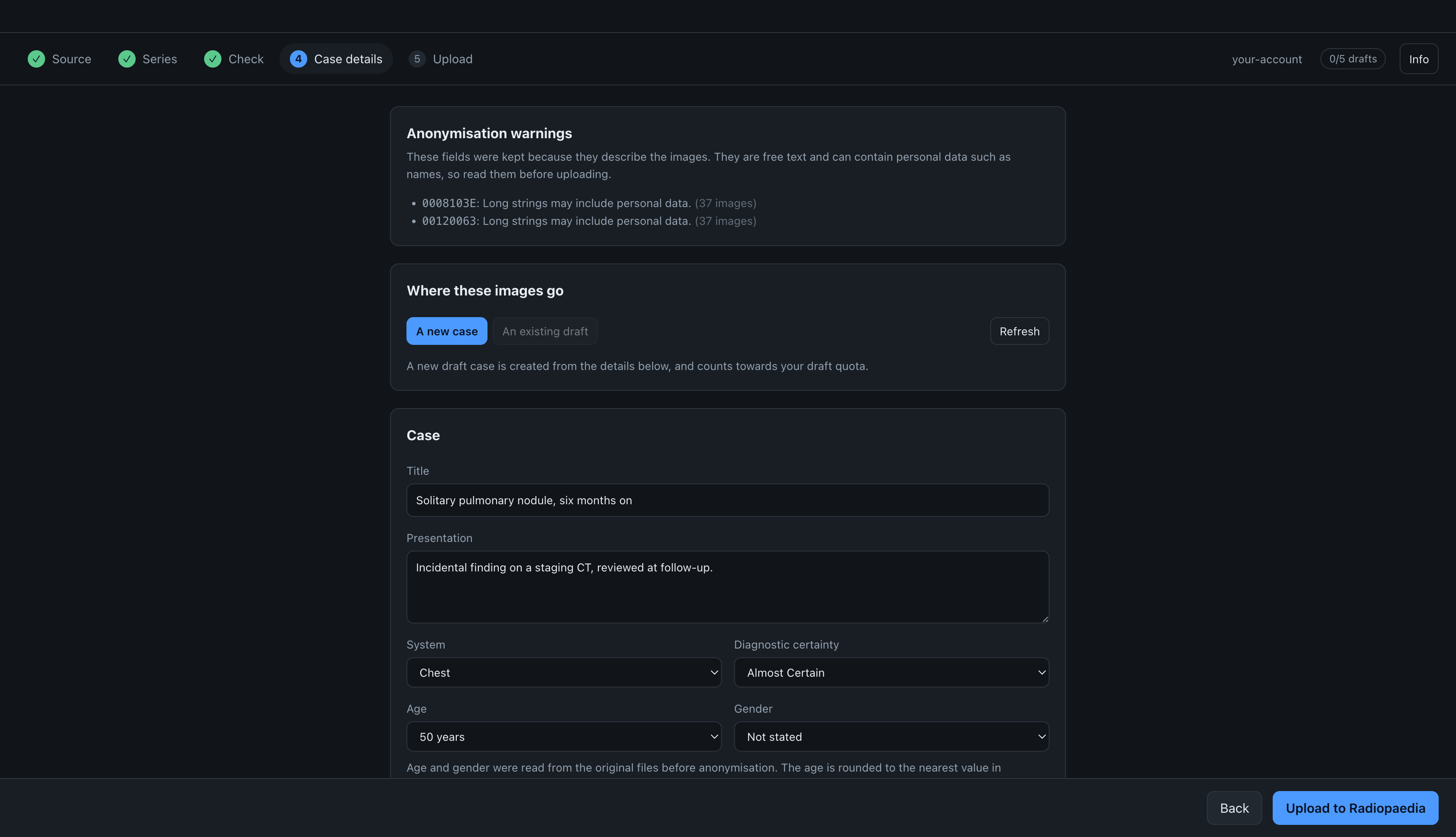
This is step four of five. To go back to the series with your choices kept, click Series in the row of steps at the top, or Back at the bottom.
Anonymisation warnings
The Anonymisation warnings card lists fields that the anonymiser kept because they describe the images, such as SeriesDescription and ContentQualification. They are free text, so an export can contain anything in them, including names. Read them before uploading.
Where the images go
Under Where these images go, choose one of:
- A new case: the details below create a new draft case, which counts towards your draft quota.
- An existing draft: the studies are added to a draft case you already have on Radiopaedia. Only draft cases are listed, because Radiopaedia does not accept new images on a case that has been submitted for review or published. The list is read when this step opens; click Refresh to read it again, for example if you published a case on the site in the meantime.
Adding to an existing draft does not change its title, age, gender, system or discussion; the API cannot change them, so edit them on Radiopaedia if needed. The studies are added as new studies. The app cannot see which studies a case already has, so if you upload the same study twice, it appears twice.
The case
Title and System are required; the other fields are optional.
- Age is chosen from a list: every year up to 18, then every five years up to 100, as on Radiopaedia. There is no value under one year, so for a younger patient the age is left empty.
- Modality uses Radiopaedia's list, for example
DSA (angiography). There is no PET-CT value. - The System and Diagnostic certainty lists are copied from Radiopaedia's API reference, because the API does not provide them.
Age and gender are filled in from the original files when they contain them. The age comes from PatientAge (0010,1010), or from PatientBirthDate (0010,0030) and the study date, rounded to the nearest value in the list (the younger one if two are equally close). Gender is filled in only for M (Male) and F (Female). For a case with several studies, the values come from the earliest study. They are suggestions, and any value you change stays changed.
Plane and sequence type cannot be set through the API. Add them on Radiopaedia after the upload.
Studies
Each DICOM study becomes one study in the case, oldest first. The study dates are not uploaded: the API has no date field, and the anonymiser removes the dates. Instead, each study has a caption with the interval since the first study, such as "Baseline", "3 months later" or "1.5 years later". A study with no readable date is captioned "Date unknown". You can edit each caption, and each study's Modality and Findings.
When two studies are on the same day, the first is captioned "Baseline" and the others "Same day". Their order comes from StudyTime (0008,0030) or, if that is missing, from the earliest acquisition time in each study. If neither is present, you can set the order in Choose what to upload.
Upload
During the upload, the progress bar at the bottom shows the amount of data sent, the total, the speed and the estimated time remaining. The progress is measured in bytes, not in files, because files vary a lot in size. The same progress is shown as a line under the row of steps.
The speed is the average over the whole upload, so it does not jump between small and large files. The speed and the time remaining appear after the first few seconds, and the time is rounded.
Radiopaedia does not store the same file twice. Files it already has are not sent again; they count as done and are shown separately, for example "40 MB already there".
If the upload stops partway, for example because the connection drops, the files already uploaded are on Radiopaedia in a draft case, and the app selects that draft. Click Upload to Radiopaedia again to continue in the same case from the series where it stopped.
This also works after you close the app: import the same study again, make the same choices and anonymise it. The case step then shows that an upload of these images stopped partway, with its draft selected, and series already uploaded are not sent again. If you changed a series that was already uploaded, for example by erasing another area, the app does not continue in the old case, because the version on Radiopaedia is the old one. To make a new case instead, click Start a new case instead.
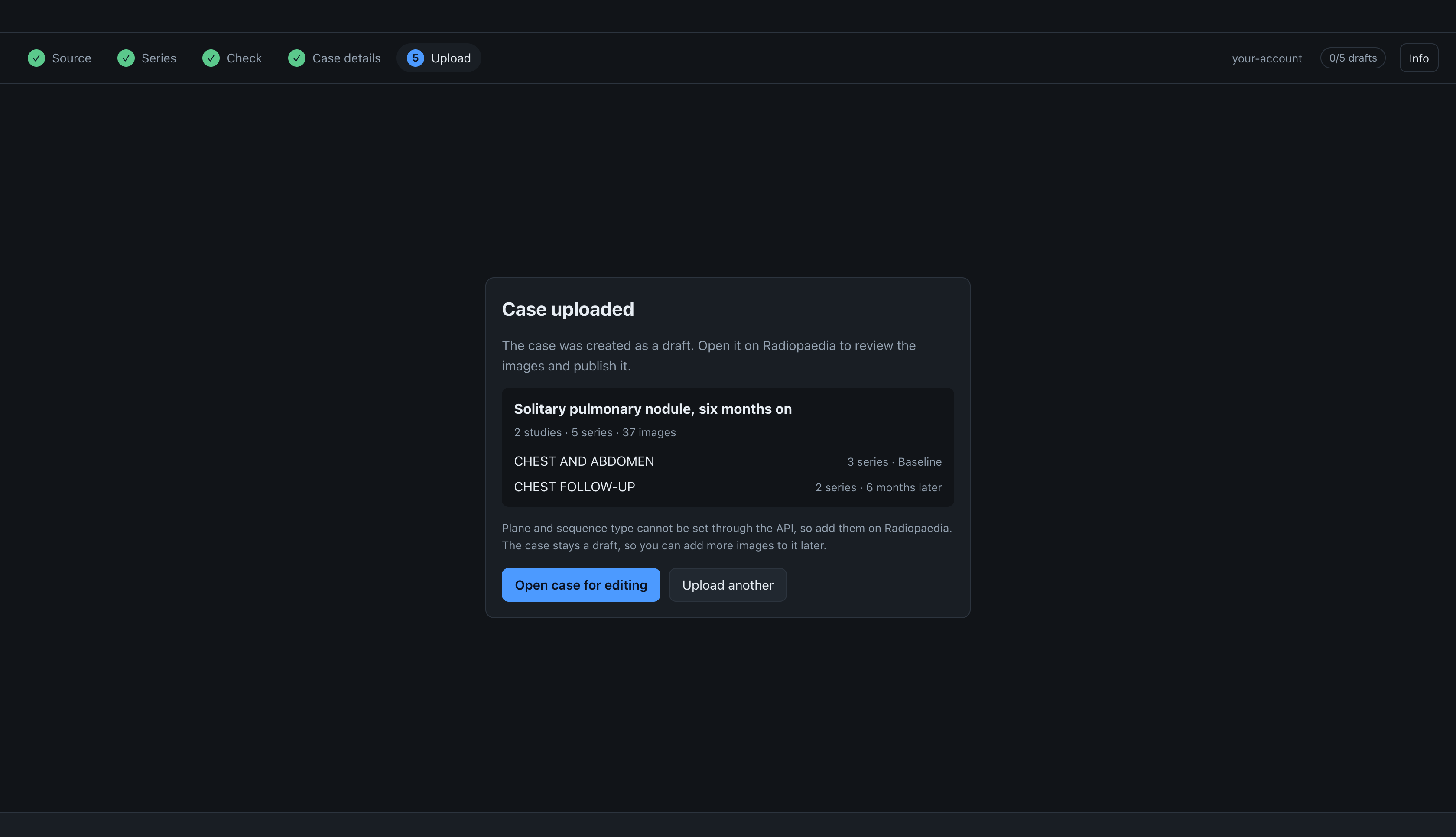
The confirmation screen shows what was uploaded: the case title, the number of studies, series and images, and each study with its series and caption. Check it to make sure you uploaded the right study.
The case is a draft, so it is not published until you publish it on Radiopaedia. Open case for editing opens the case on Radiopaedia, where you can add the plane and sequence type. Upload another starts again with a new study.
The app uploads each series separately instead of as one zip file, so that split series stay separate on Radiopaedia; see why upload goes through S3.