
Annotate
Annotate, below the card of a stack, draws coloured structures on its images and adds a copy of the stack with the colours in its pixels to the case. A typical use is marking the spinal canal on every slice of a spine MRI, or outlining a mass on the slices it is on.
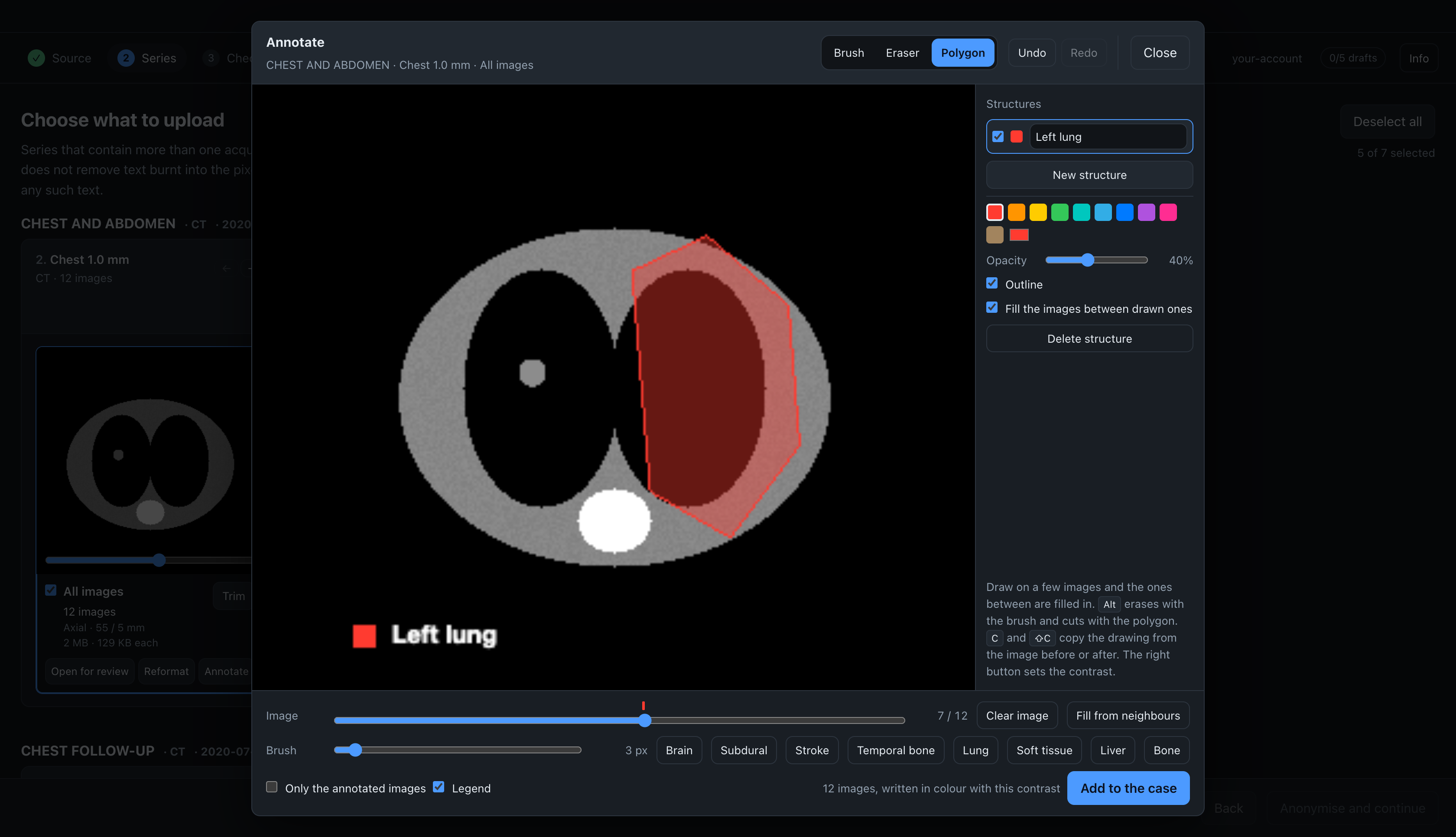
The stack itself is not changed. The copy is a separate series next to it, so the case can show the images with and without the drawing.
Drawing
The list on the right holds the structures. Each has a name, a colour and an opacity. Click a structure to draw with it. New structure adds another one. The checkbox next to the name hides a structure; a hidden structure is left out of the copy.
| Tool | Key | Use |
|---|---|---|
| Brush | B | paints; hold Alt to erase |
| Eraser | E | erases |
| Polygon | P | click the corners, then click the first corner, double-click or press Return to fill the shape; hold Alt as you close it to cut the shape out |
Brush sets the brush radius in pixels of the image as shown, from 0.5 to 40. [ and ] change it too.
Outline draws the edge of the structure at full opacity. Opacity sets the fill.
Images between drawn ones
Draw on a few images of the stack. The images between two drawn images are filled in: the shape moves and changes from one drawn image to the next. The strip above the Image slider shows the drawn images of the chosen structure as tall marks and the filled images as short marks.
Drawing on a filled image makes it a drawn image. Fill from neighbours turns a drawn image back into a filled one. Clear image marks the image as the place where the structure ends: between the last drawn image and this one, the structure shrinks to nothing.
The filling works for shapes drawn with the brush and with the polygon. It does not work well when a structure splits in two between two drawn images. In that case, draw an extra image between them.
Fill the images between drawn ones turns the filling off for one structure. Only the drawn images then have colour.
Keys
| Input | Action |
|---|---|
| Mouse wheel, arrow keys, Page Up, Page Down | previous or next image |
| Home, End | first or last image |
C, Shift+C | copy the structure from the previous or the next image |
| Backspace | remove the last corner of the polygon |
| Esc | cancel the polygon, or close the dialog |
| ⌘Z or Ctrl+Z | undo |
| ⇧⌘Z, Ctrl+Shift+Z or Ctrl+Y | redo |
| Right-button drag | set the window: right widens it, down raises its centre |
Undo keeps the last 200 changes.
Legend
Legend puts a box in the lower left corner of every image of the copy, with the colour and name of each structure. It lists the structures that are shown and drawn on at least one image. The text is sized to the image: 11 pixels high on a 256-pixel image, 33 on a 1024-pixel one.
The legend is text in the pixels, so the check before anonymising may mark it. It holds only the names you typed, so check that they contain no patient data.
Contrast
The copy is written in colour, so the window cannot be changed on it later. The images are written with the window shown in the dialog. The dialog opens with the window set in Open for review, or with the one stored in the files. On a CT, the CT window presets are shown under the image.
Adding the copy to the case
Add to the case writes the copy and puts it next to the stack in the list. It is anonymised and uploaded like any other series. The images are real DICOM files, written to the session's temporary folder and deleted with it.
The copy contains the images of the stack that are going to be uploaded, after the trim and the images you dropped. Only the annotated images leaves out the images before the first and after the last one with colour on it.
Close keeps the drawing for as long as the import is open. Opening Annotate on the same stack again shows it where you left it. After a copy has been added, the button reads Update the case, and it replaces that copy with a new one.
What the copy keeps from the stack
- Areas you erased in Open for review are black in the copy, over the drawing and the legend.
- The crop of the stack applies to the copy.
- Each image keeps the position and orientation of its source image, so the copy scrolls in step with the stack.
The copy is 8-bit RGB. It is written as a Secondary Capture (ImageType DERIVED\SECONDARY) with its own series UID. Its series number is the stack's plus 200, and its series description is the stack's with (annotated) after it.
Limitations
- A drawing is made on the image as shown in the dialog. On images larger than 1024 pixels it is drawn on a reduced image and enlarged when it is written, so its edge is less sharp.
- All images of the stack must have the same size.
- A drawing is kept per stack. Switching a dynamic series between By phase and By slice makes new stacks, and drawings on the old ones are no longer shown.