The check before anonymising
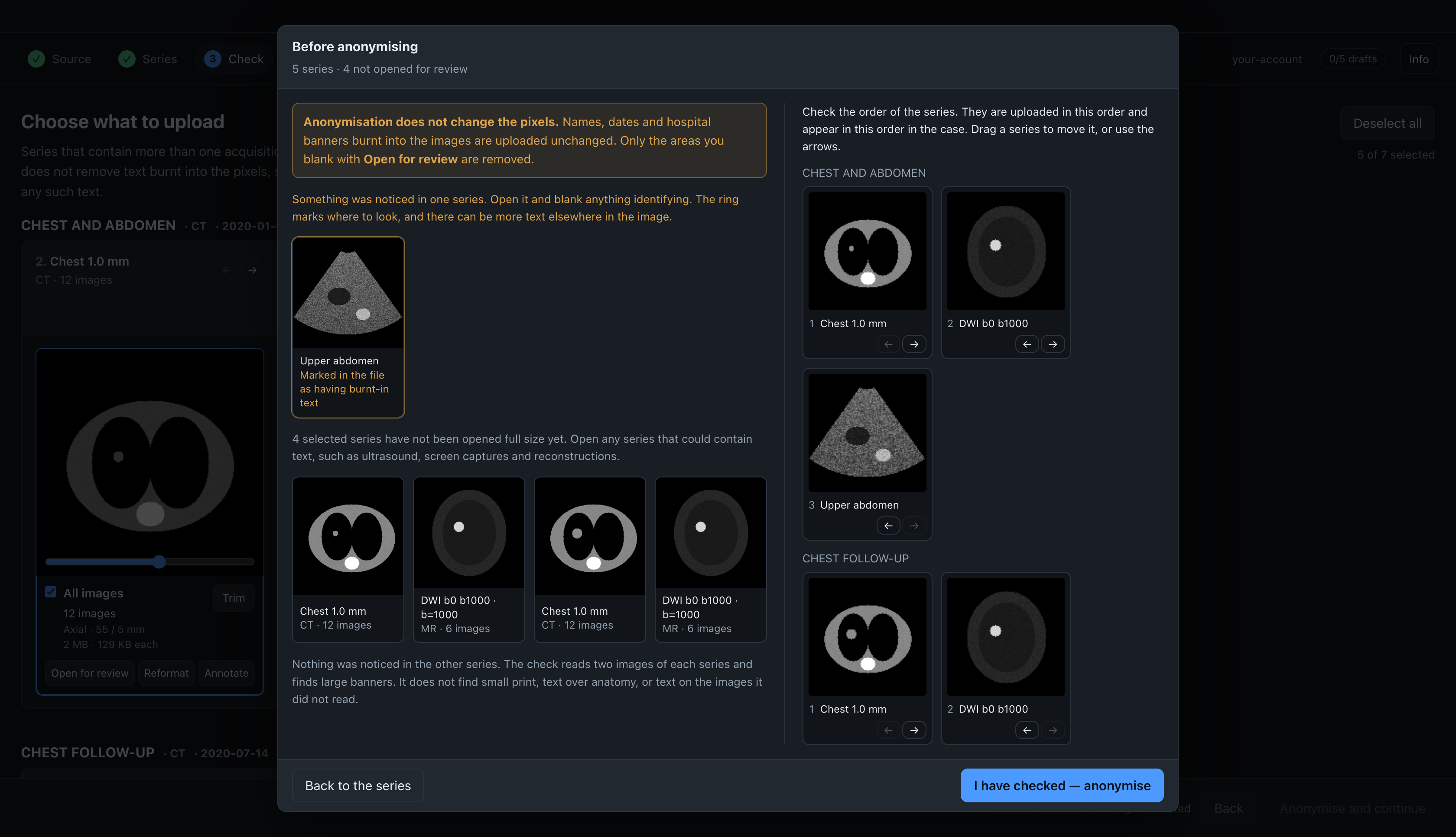
When you click Anonymise and continue, the app first shows the Before anonymising dialog.
During anonymisation, erased areas are written into the pixels. After that, a change means anonymising again, so this dialog is the last chance to erase something without redoing the run.
The dialog is the Check step in the row of steps at the top of the window. Click Series in that row, or Back to the series in the dialog, to go back to the series with your choices kept. I have checked — anonymise starts anonymisation. While the dialog is open, the buttons behind it are disabled.
What the dialog shows
Areas that look like burnt-in text. The app reads two images of every selected series, the middle one and the one furthest from it, and marks areas that look like a text overlay: very bright or very dark pixels with sharp edges that are the same in both images, while the anatomy changes between them. Series with such areas are listed first, with the marked area ringed on a thumbnail. Areas you have already erased are not checked. A stack with a single image cannot be compared, so it is checked on brightness and edges only, which makes the check less reliable there.
Files that declare burnt-in text. If a file has BurnedInAnnotation (0028,0301) set to YES, the dialog reports it. A value of NO, or no value, is not reported, because exporters often set it without checking.
Series you have not opened. The app records which stacks you opened in the viewer. The dialog lists the selected ones you have not opened, each with a thumbnail and an Open for review button. A stack leaves the list once you open it. When every selected stack has been opened, the dialog says so, and still asks you to confirm: opening a stack is not the same as reading every image in it.
Checking the order
Next to the burnt-in text check, the dialog shows all selected stacks in the order they will be uploaded, numbered as they will appear in the case. Stacks from a split series are grouped together.
To change the order, drag a card onto the card whose place it should take, or use the arrows under each card to move it one place at a time. You can only move a card within its own study, because studies are ordered by date. The stacks of a split series move together.
The order is not shown when there is nothing to arrange, that is, when there is a single series or one series per study.
What the check does not find
The check does not tell you that a series is free of burnt-in text. It finds large banners. It does not find small print, text over anatomy, low-contrast text, or text on images it did not read, and it does not read the text it finds. If the dialog lists nothing for a series, nothing was noticed in the two images it read; there can still be text in the series.
Check every image yourself before you click I have checked — anonymise.