
Write the article
The 4 Write tab is a Markdown editor for Radiopaedia articles. It inserts the section headings Radiopaedia recommends for the type of article, numbers the citations, and produces the formatted text to paste into Radiopaedia's editor.
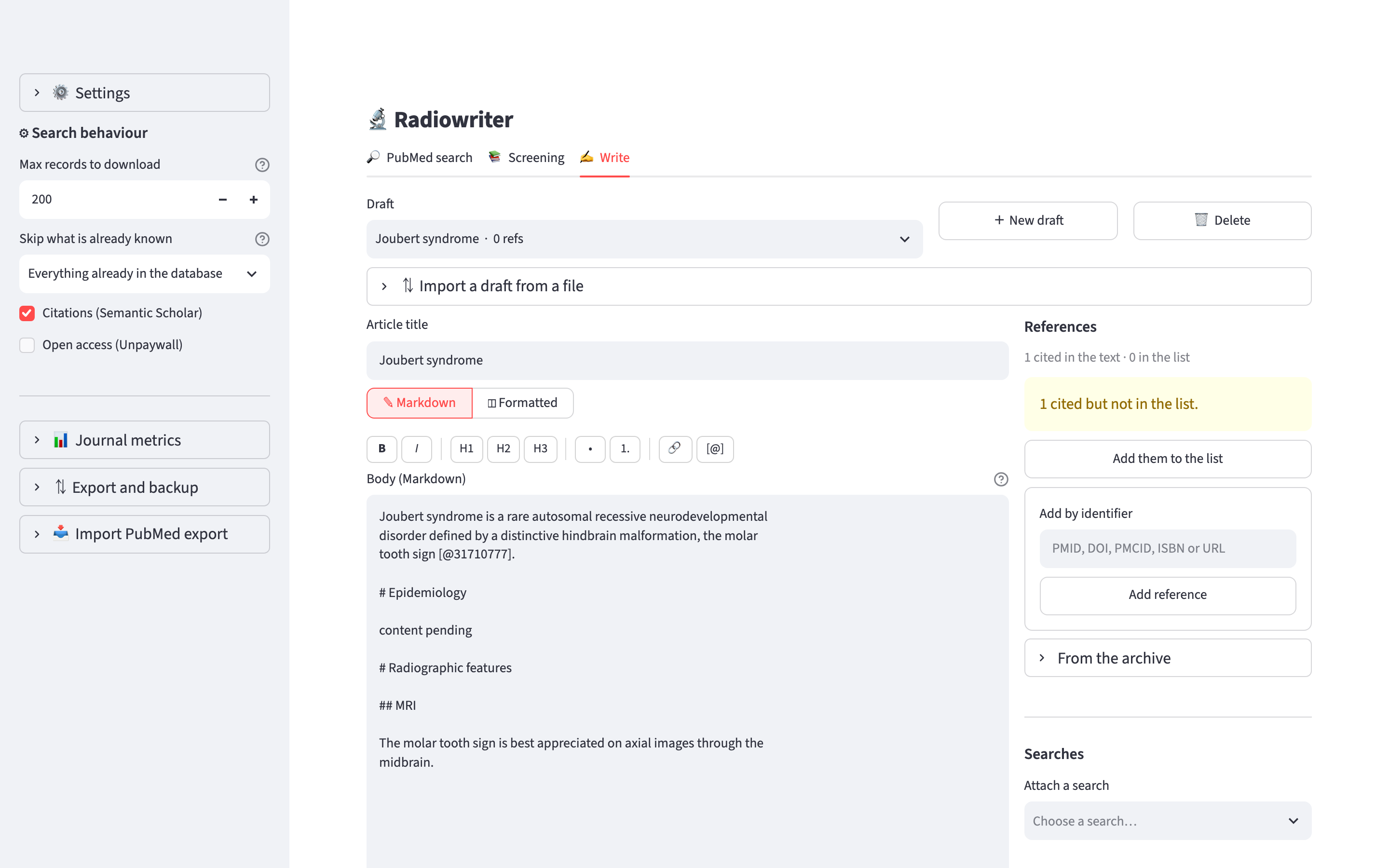
Drafts and the editor
+ New draft creates a draft, and the Draft list at the top chooses the one to work on. 🗑 Delete deletes the draft and its reference list, after a confirmation.
The editor has two views:
- ✎ Markdown is where you write.
#is a section heading (h3 on Radiopaedia),##is a subheading (h4). The toolbar and⌘B,⌘Iand⌘K(Ctrlon Windows and Linux) insert bold, italic and a link. - ◫ Formatted is read-only. It shows the HTML that the copy button puts on the clipboard, with the citation numbers in place.
The title and the text are saved when the field loses focus.
Section headings
Radiopaedia has 23 article structures. The standard structure is used for most articles and includes Terminology, Epidemiology, Clinical presentation, Pathology, Radiographic features, Treatment and prognosis, History and etymology, and Differential diagnosis. Other types of article have their own structure. An anatomy article, for example, has Gross anatomy and Variant anatomy and no Epidemiology.
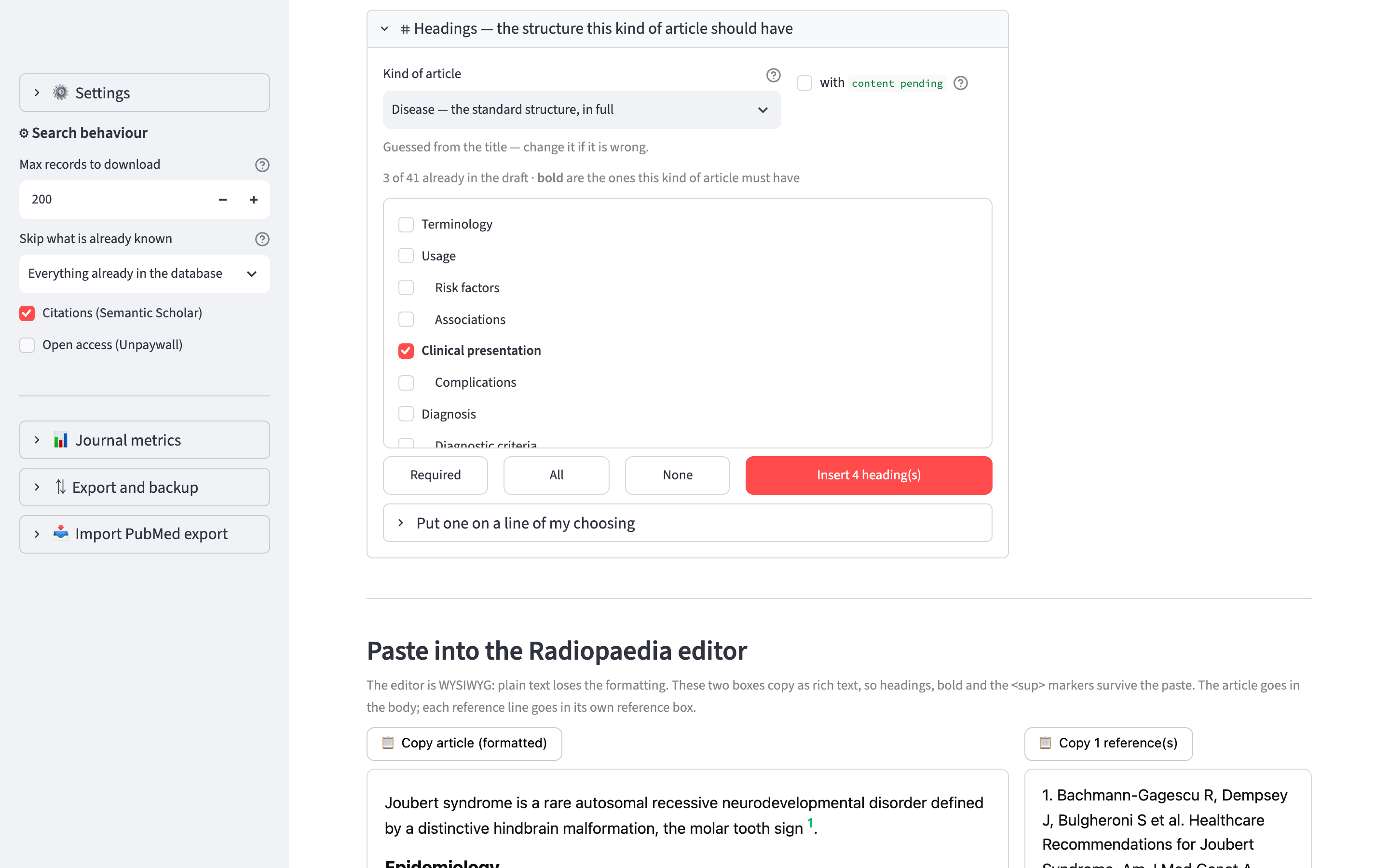
Open ⌗ Headings for this kind of article to insert headings:
- Kind of article chooses the structure. The app guesses it from the title until you choose one yourself. Your choice is saved with the draft.
- The list shows the headings that are not in the draft yet. The ones this kind of article must have are in bold and are ticked. Required, All and None change the selection.
- Insert N heading(s) inserts the ticked headings in the order of the structure.
Tick with content pending to put Radiopaedia's placeholder text under each inserted heading. The linter has a rule that finds these placeholders.
To insert one heading at a specific line, open Put one on a line of my choosing. If the line is inside a section that is not the heading's parent in the structure, the app shows a warning. You can then insert the heading at the line the structure gives or at the line you chose.
The same heading can have different parents. Complications under Clinical presentation are complications of the disease. Complications under Treatment and prognosis are complications of the treatment. An article can have both.
Citations
Cite a source by its identifier:
The lesion was heterogeneous on CT [@27859258].The identifier can be a PMID, a DOI, a PMCID, an ISBN or a URL. The citations are numbered at export, in order of first appearance, so you do not renumber anything when you add a source in the middle of the article. If two identifiers are the same paper, for example a PMID and a DOI, they get one number, and the References panel says which ones were merged.
🔎 Resolve N citation(s) asks radiopaedia.work/cite for the formatted citation of each identifier that has none yet. A resolved citation is stored in the database and is not requested again, in this draft or in others.
The reference list
The References panel, to the right of the editor, holds the sources of the draft. There are four ways to add them:
- Add by identifier: type a PMID, DOI, PMCID, ISBN or URL.
- Add them to the list: adds the identifiers cited in the text that are not in the list. The button appears when there are any.
- From the archive: choose from your flagged articles or from a reading list.
- From the results of a search, with Add selected to a draft….
A reference that is in the list and is not cited in the text gets no number. The app lists these under the copy boxes.
Under Searches, the panel lists the searches attached to the draft. You can attach another recent search or detach one.
Copying the article into Radiopaedia's editor
Radiopaedia's editor is a rich-text editor, and text pasted as plain text loses its formatting. Under Paste into the Radiopaedia editor there are two buttons that copy rich text, so headings, bold and the <sup> citation markers are kept:
- 📋 Copy article (formatted): paste it into the body of the article.
- 📋 Copy N reference(s): the reference list. On Radiopaedia each reference goes in its own box. Reference list, one line per box shows them one by one.
HTML source shows the HTML that is copied.
The linter
Radiopaedia publishes the rules of its linter at radiopaedia.work. They are transcribed in radiowriter/data/lint-rules.json. Lint the draft runs them on the draft, on your computer. Nothing is sent to Radiopaedia.
Each finding is an error (🔴), a warning (🟠) or a suggestion (🔵), with the line of the draft and, where there is one, a link to the style guide.
The rules run on the HTML of the article and not on the Markdown, because many of them are about <sup>, <strong>, <em> and heading tags.
Radiopaedia's linter has registered exceptions that the app does not have. Where the two disagree, follow Radiopaedia's.
Exporting and importing a draft
Under Keep a copy there are two buttons:
- ⤓ Export .json writes the whole draft: the text, the kind of article, the references with their notes, and the resolved citations.
- ⤓ Export .md writes the text only, as a Markdown file that any text editor opens.
⇅ Import a draft from a file, at the top of the tab, reads a .json file. It always creates a new draft and does not overwrite an existing one. A .md file cannot be imported, because it does not contain the kind of article, the references or the citations.