Screen the results
The 2 Screening tab shows the archive, which holds every article you saved from a search. You can filter it, sort it, and mark each article.
The tab is a page of its own inside the app, and it scrolls separately from the rest of the window. A tick or a filter is applied at once, without reloading the app.
Read, flagged and reading lists
Each article has two checkboxes, ✅ Read and ★ Flagged.
A reading list is a named group of articles, for example the papers for one section of your article. You can have any number of lists, and an article can be in several.
To create a list, open 🗂 Lists at the top of the tab, type a name and click + Create. You can also create one from the results of a search, with Add selected to a list…. To rename a list or change its note, edit the text in its box. The change is saved when you leave the field or press Enter. Deleting a list does not delete its articles from the archive.
To add an article to a list from the archive, use 🗂 Add to a list on its card.
Read articles are deleted at startup
Articles marked read are deleted from the archive each time the app starts. Their PMIDs are kept, so that later searches can skip them. An article is not deleted if it is in a reading list or has a PDF in the library.
Deleting articles
🗑 Delete on a card deletes the article from the archive at once. It is also removed from every list it is in. Its PMID is kept, so later searches skip it, as for a read article deleted at startup.
To delete several articles:
- Tick Select on each card, or click Select this page or Select all N found. Select all N found selects every article that matches the filters, on every page. To empty a list, choose it under In list: first.
- Click 🗑 Delete N selected.
- Click Yes, delete them.
Clear empties the selection.
An article with a PDF in the library is not deleted. Remove the PDF in the Library tab first.
Reading the abstracts
Abstracts are set in a serif typeface, in lines of at most 70 characters. Each section of a structured abstract (BACKGROUND, METHODS, RESULTS and so on) is a separate paragraph with its label above it. Abstracts imported from a .nbib file are split at their labels in the same way.
Abstracts open shows every abstract on the page expanded. The setting is shared by the search results and the Screening tab, and is remembered when the app is restarted.
The words you searched for are highlighted in titles and abstracts. In the search results they are taken from the search you ran. In Screening they are taken from the 🔍 Search title, abstract or PMID box. The rules are:
- field tags and operators are ignored;
- the term that follows
NOTis not highlighted; - a regular English plural is also highlighted (abscess highlights abscesses);
- a term ending in
*highlights every word that starts with it; - inside a quoted phrase, a space also matches a hyphen.
The highlighting does not show why PubMed returned a paper. PubMed expands terms through MeSH and automatic term mapping, so a paper can be found through a word that is not highlighted.
Under ⚙️ Settings in the sidebar, Abstract typeface switches the abstracts to the sans-serif typeface used in the rest of the app, and Abstract size (rem) and Title size (rem) change the text sizes.
To choose the light or dark theme, open the ⋮ menu at the top right and choose Settings. System follows your operating system.
Filtering and sorting
| Control | What it filters |
|---|---|
| Show: | All, To read, Read or Flagged ★ |
| In list: | The articles in one reading list |
| 🔍 Search title, abstract or PMID: | The articles containing the text |
| Journal quartile: | One or more of Q1 to Q4, and Not in SCImago |
The filters are applied by the database query, so the total and the number of pages count only the articles that match. The list is updated as you type in the search box.
An article you tick as read stays on the page until the list is loaded again, also when Show: is set to To read. The list is loaded again when you change a filter or a page, and when you come back to the tab.
The filters and the selection are kept while the app is open in that browser tab.
Articles per page: sets how many articles each page shows.
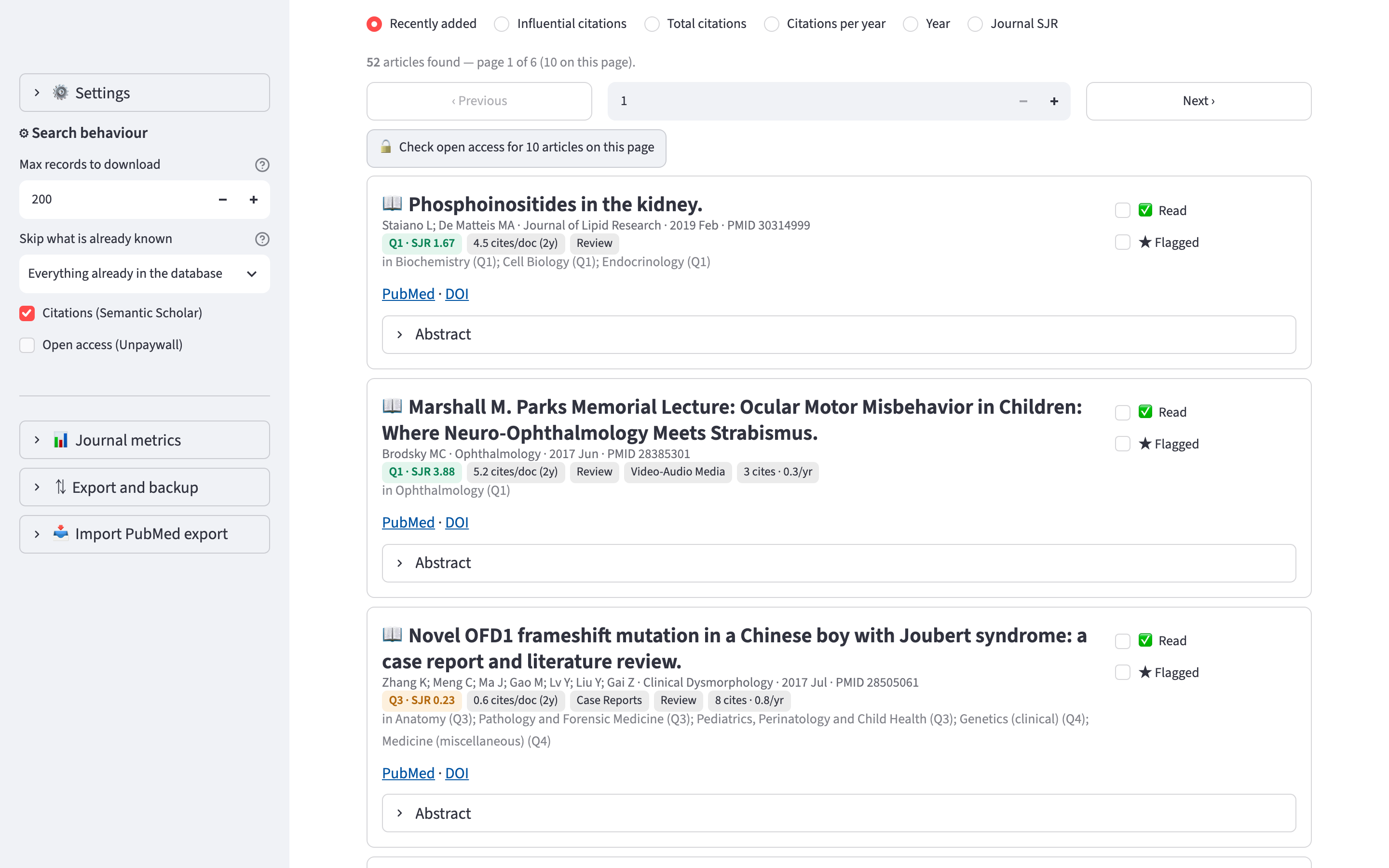
Sort by: has six options: Recently added, Influential citations, Total citations, Citations per year, Year and Journal SJR.
‹ Previous and Next › change page, above and below the cards. The box between them takes a page number.
The article card
Each article is shown as a card:
📖 Diagnostic evidence in suspected discogenic low back pain
   Authors · Frontiers in Medicine · 2026 · PMID 42639130
   ▎Q1 · SJR 0.95   3.4 cites/doc (2y)   🔓 gold OA   79 cites · 6 infl · 8.8/yr
   in Medicine (miscellaneous) (Q1); Neurology (Q2)
   PubMed · 🔓 LibKey full text · DOI · Free full text
   ▸ Abstract         ☐ ✅ Read  ☐ ★ Flagged  ☐ Select  🗂 Add to a list  🗑 Delete
The lines are, in order:
- The title. It starts with 📖 for an article to read, ✅ for a read one, and ★ if it is flagged.
- Authors, journal, date and PMID.
- Badges: quartile and SJR, cites/doc, open access status, publication types, citations, the lists the article is in, and 📄 PDF if it has a PDF.
- The SCImago categories of the journal, each with its quartile. The quartile in the badge is the best of these.
- Links to PubMed, LibKey, the DOI and the free full text, where available.
- The abstract, collapsed unless Abstracts open is on.
At most three publication types are shown. Journal Article, English Abstract, Comparative Study, Validation Study, Historical Article and the Research Support types are not shown.
Citations and full text
📈 Fetch citations for N articles on this page asks Semantic Scholar for the citation counts of the articles on the page that have none yet.
🔓 LibKey full text opens the article through your library's subscription. It appears if you set the LibKey library ID.
Free full text appears after Unpaywall has been asked about the article. There are two ways to ask:
- click 🔓 Check open access for N articles on this page, above the list;
- tick Open access (Unpaywall) in the sidebar before a search, so that new records are checked as they are downloaded.
⤓ Save free PDF, in the right-hand column of the card, downloads the free copy into the PDF library. When an article has a PDF, the card shows a 📄 PDF badge and a 📖 Read PDF button. To add a PDF you downloaded through LibKey, drop it into the Library tab. See PDFs and the study window.