
Search PubMed
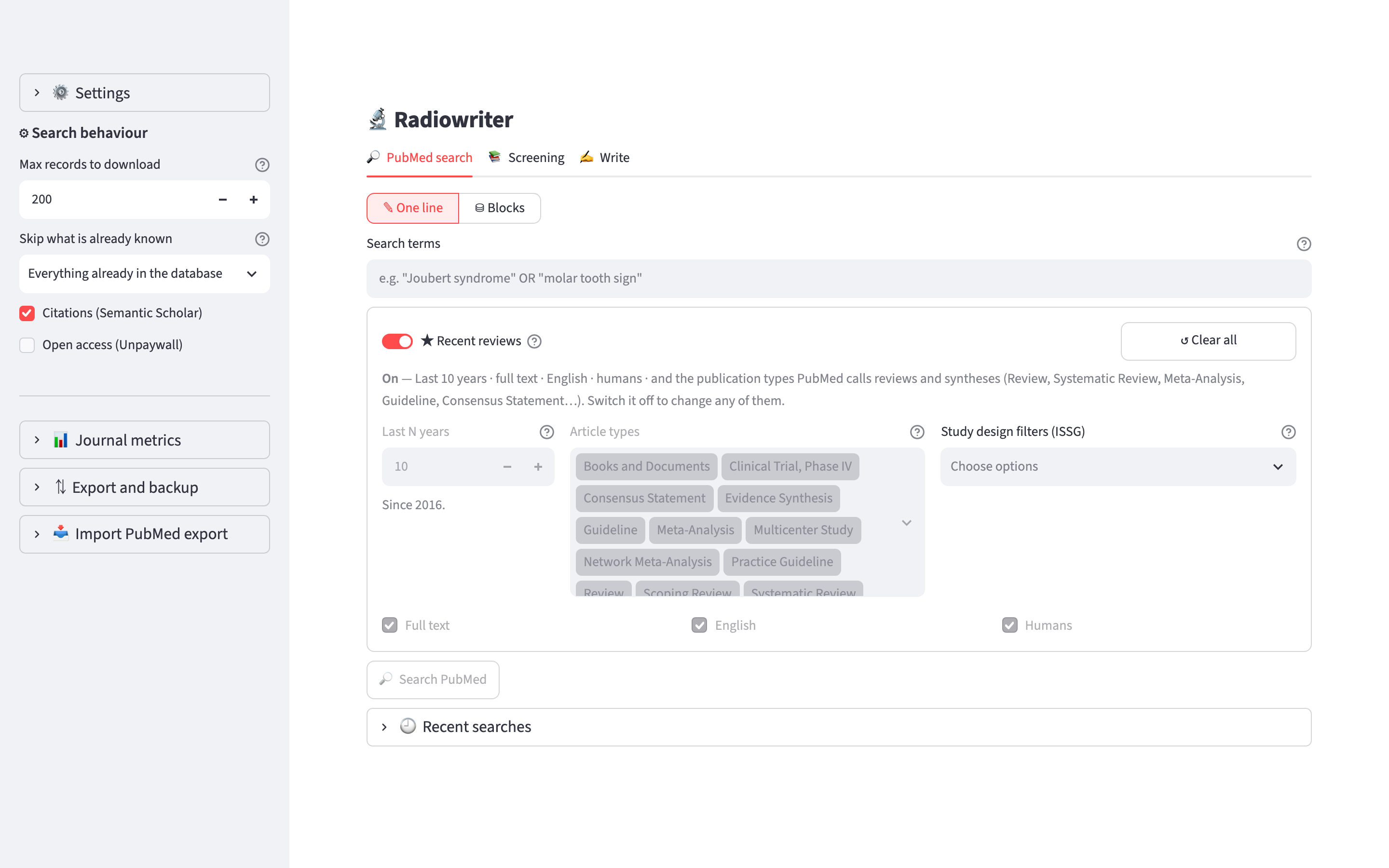
The control at the top of the tab chooses between two ways of searching. ✎ One line takes PubMed syntax as you type it. ⛁ Blocks builds the query one concept at a time, and is described in Build a query in blocks.
Recent literature of an editorial group
The button 📰 Fetch recent literature at the top of the tab opens a panel that fetches the recent reviews and guidelines of a Radiopaedia editorial group. It searches by journal and does not use the search terms or the filters below it.
- Click 📰 Fetch recent literature. Click it again to close the panel.
- Choose the group under Editorial group. CNS is the only group for now.
- Choose the reading list under Save in list. The first choice is the list of the group, Editorial group: CNS. The others are your existing lists and + New list…, which asks for a name.
- Click Fetch.
The first run covers the last 30 days. Later runs start 7 days before the previous run, because PubMed adds the publication type to some records a few days after they appear. Articles already in the archive are skipped, so the overlap does not create duplicates. The date of the last run is shown in the panel.
The search uses the date an article was added to PubMed, and returns reviews, systematic reviews, meta-analyses and guidelines in English. Guidelines are found with the ISSG filter Guidelines (standard).
The journals come from the SCImago file. For CNS they are:
| Journals | How they are chosen | Articles kept |
|---|---|---|
| Neuroradiology, neuroimaging and spine | Title contains "neuroradiol", "neuroimag", "spine" or "spinal", and best quartile Q1 or Q2 (32 journals) | All |
| Radiology | Q1 in the category Radiology, Nuclear Medicine and Imaging (84 journals) | All |
| Neurology | Q1 in the category Neurology (clinical) (91 journals) | All |
The numbers are for the SCImago table of 2025. A run covering 30 days returned about 600 articles on 2 October 2026.
Every article found is saved in the archive and added to the list chosen under Save in list. To screen them, open the Screening tab and choose that list under In list:. An article in a list is not deleted at startup when it is marked read, so the list keeps the articles you have screened until you remove them from it or delete the list.
The run is recorded in 🕘 Recent searches.
The filters
The filter control is below the search terms. It has three positions, and the position decides which filters are sent to PubMed.
Recent reviews, No filters, Custom
- ★ Recent reviews applies the last 10 years, full text, English, humans, and these NLM publication types: Review, Systematic Review, Scoping Review, Meta-Analysis, Network Meta-Analysis, Evidence Synthesis, Guideline, Practice Guideline, Consensus Statement. No controls are shown. The ? button next to the control lists these filters.
- No filters applies no filter, including the date limit. Only the search terms are sent to PubMed. No controls are shown.
- Custom shows the controls described below. The first time, they hold the values of ★ Recent reviews. After that they keep the values you left, also while another position is selected.
In Custom, the line under the controls describes the filters that the query will apply. It is written from the same values as the query.
The controls below are shown in Custom only. They are the filters of the left column of a PubMed results page. Choices within one group are joined with OR, and the groups are joined with AND, as on PubMed.
Publication date
Last N years limits the search to the last N years. 0 means no date limit. Between two years shows From year and To year, and limits the search to publication dates from 1 January of the first to 31 December of the second.
Text availability and article attribute
- Abstract: records that have an abstract.
- Free full text: records that link to a full text free to read.
- Full text: records that link to a full text, free or not.
- Associated data: records that link to data, for example a data repository or a trial registry.
These four are joined with AND. With Abstract and Full text ticked, a record must have both.
Article language and Age
Article language lists the 58 languages of PubMed. Age lists its 14 age groups.
Species, sex and other
- Humans excludes records indexed as animal studies and not as human studies:
NOT (animals[mh] NOT humans[mh]). It does not usehumans[mh], because that would also exclude every record NLM has not indexed yet, which includes most papers from the last few months. - Other animals keeps records indexed as animal studies.
- With Humans and Other animals both ticked, the query uses the two PubMed filters joined with OR:
(humans[Filter] OR animal[Filter]). - Female and Male keep records indexed with female or male subjects.
- Exclude preprints adds
NOT preprint[pt]. - MEDLINE keeps records with the status MEDLINE.
PubMed joins Exclude preprints and MEDLINE with OR. Radiowriter joins them with AND.
WARNING
Age, Other animals, Female, Male and MEDLINE use MeSH indexing. Records NLM has not indexed yet are left out, which includes most papers from the last few months.
Kind of publication
Choose Any or one of two methods:
- Publication type (NLM) uses the labels an NLM indexer gave the record. The list has the 66 article types of PubMed.
- Search filter (ISSG) uses published search filters from the InterTASC Information Specialists' Sub-Group. They find a kind of publication by the words it uses. Four are available: guidelines (broad), guidelines (standard), meta-analysis and systematic reviews.
The two methods cannot be used together. They would be joined with AND, and only records matching both would be returned. Several choices within one method are joined with OR. If you switch method, the choices you made in the other one are kept for when you switch back.
Radiopaedia headings as a filter
⌗ Radiopaedia headings, below the filter control, limits the search to the topics of the headings Radiopaedia asks for in an article. For example, Epidemiology adds terms for prevalence and incidence. It is shown with ★ Recent reviews and Custom, and works with ✎ One line and ⛁ Blocks.
- Click ⌗ Radiopaedia headings to open the panel.
- Choose the Kind of article. The headings offered are the ones of that kind. Changing it clears the headings chosen.
- Under Terms, choose MeSH + keywords, MeSH only or Keywords only. The table in Build a query in blocks describes the three.
- Choose the headings under Headings. The terms of each one are listed below.
The headings chosen are joined with OR, and the group is joined with AND to the search terms and the other filters.
Click the button again to close the panel. The headings stay in the query: the button shows how many, and the line below it names them. To remove them, open the panel and clear Headings. No filters leaves them out of the query and keeps the choice for when you go back.
The list of headings is the one the Radiopaedia lint userscript uses (article-structure.json). To put the headings of one of your drafts in a block, use ⌗ Terms from the Radiopaedia headings in Build a query in blocks.
Settings in the sidebar
Four settings under ⚙ Search behaviour in the sidebar apply to every search and are not changed by the presets:
- Records to download: how many records are downloaded in detail.
- Skip what is already known: which records to leave out because they are already in the database.
- Citations (Semantic Scholar): look up citation counts.
- Open access (Unpaywall): look up whether a free copy exists.
Filtering the results
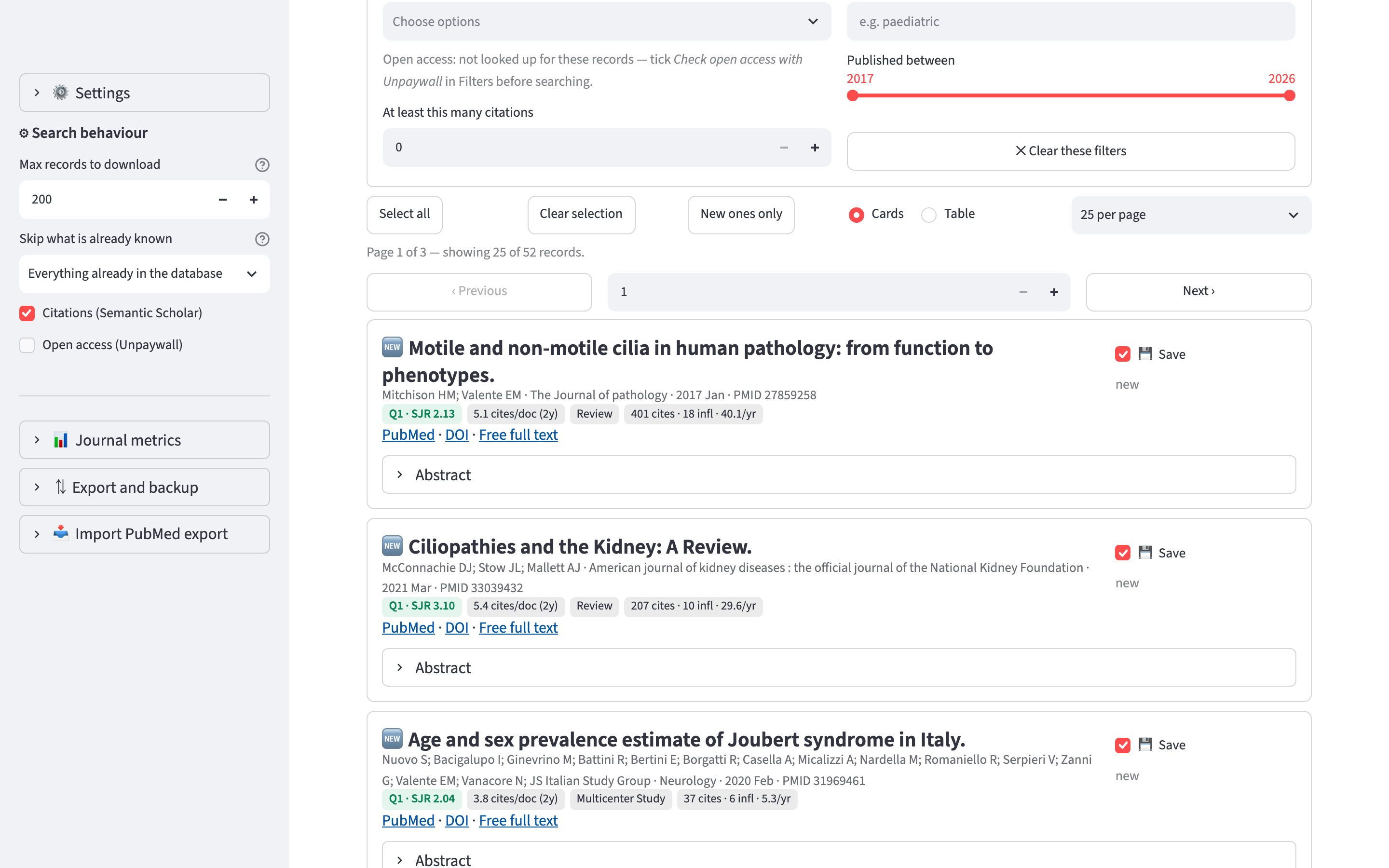
When a search has returned results, ⚙ Filter these results narrows what is shown. PubMed is not queried again.
- Status: new, already in the archive, or already screened.
- Article type: the publication types NLM gave these records.
- Journal quartile: includes Not in SCImago.
- Words in title or abstract.
- Published between: limited to the years of the records you have.
- At least this many citations: available after citations have been looked up.
- Only free full text: available if Open access (Unpaywall) was ticked before the search.
The status, article type and quartile options show how many of the results match each one.
When a filter hides some results, a line above the table reads, for example, Showing 15 of 200. Saving, adding to a list and adding to a draft apply only to the records shown. A record that is ticked but hidden by a filter is not included.
The search log
Every search is recorded. 🕘 Recent searches, at the bottom of the tab, lists each search with its date, its terms, and the number of records found, downloaded and saved.
When you add results to a draft as references, the search is attached to that draft, so the draft records which search its references came from.