
Build a query in blocks
The block builder composes a query from concepts, for example the disease, the modality and the finding. Each concept is one block. Inside a block you write the concept in each of the ways papers write it.
Block 1   "Joubert syndrome"[tiab] OR "molar tooth sign"[tiab]
Block 2   MRI[tiab] OR "magnetic resonance"[tiab]
──────────────────────────────────────────────────────────────
("Joubert syndrome"[tiab] OR "molar tooth sign"[tiab]) AND (MRI[tiab] OR …)
The lines inside a block are joined by OR, so a paper matching any one of them is found. The blocks are joined by AND, so a paper has to match every block.
The kind of publication is not a block. Set it in the filters below the builder.
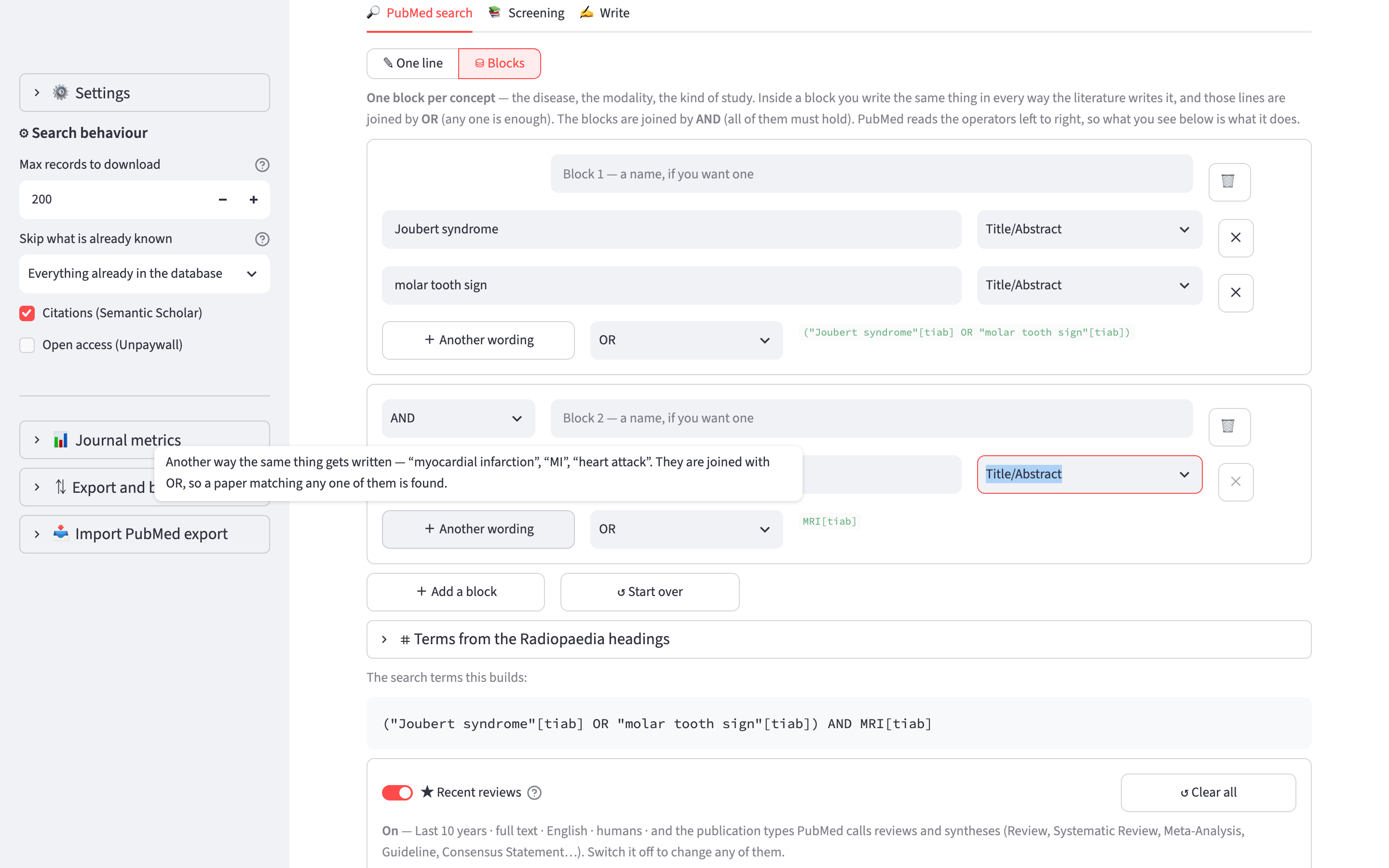
The parts of a block
+ Another wording adds a line for another way of writing the same concept. For example, myocardial infarction, MI and heart attack are three lines of one block.
The field list next to each line sets where PubMed looks for the term: Title/Abstract, Title, Text word, MeSH terms, Publication type, Author, Journal and others. Terms of more than one word are put in quotation marks automatically. A term that already has a field tag is left unchanged. For example, "Brain Abscess"[Mesh] is sent as typed.
The list next to + Another wording sets how the lines inside the block are joined. It is OR by default, and can be changed to AND or NOT.
The list at the top left of each block after the first sets how the block is joined to the previous ones. It is AND by default, and can be changed to OR or NOT. A NOT block removes what it matches, for example case reports.
+ Add a block adds a block. ↺ Start over clears the builder.
PubMed reads operators from left to right and does not give AND precedence over OR. Each block is therefore put in its own brackets. The query shown under the builder is the one PubMed receives.
Terms from the Radiopaedia headings
The app can turn the section headings of an article into search terms. For example, Epidemiology gives terms for prevalence and incidence, Treatment and prognosis gives terms for therapy and survival, and MRI gives terms for magnetic resonance.
- Open ⌗ Terms from the Radiopaedia headings.
- Choose where the headings come from: A draft uses the headings of one of your drafts, An article type uses the structure Radiopaedia recommends for that type of article.
- Under Terms, choose what to build from each heading (see the table below).
- Choose the headings.
- Under Where do they go, choose A new block, joined with AND or an existing block, then click the Add button.
| Terms | What it builds |
|---|---|
| MeSH only | Controlled vocabulary. It is precise, but finds only records MEDLINE has already indexed, which excludes most papers from the last few months. |
| Keywords only | Words in the title and abstract. It also finds records that are not indexed yet, and returns more irrelevant results. |
| MeSH + keywords | Both, joined by OR. This is the default. |
127 headings have a strategy. Headings such as See also and Practical points have none, because they are sections of an article and not search topics. They are not offered.
The headings you choose are added to the same block, one per line, joined by OR. If you put them in separate blocks they would be joined by AND, and the query would ask for papers that cover epidemiology, MRI and prognosis together. That usually returns very few results.
The same terms are available as a filter for any search, including a search typed on one line. See Radiopaedia headings as a filter.
The MeSH terms are checked against PubMed
A MeSH descriptor that does not exist matches nothing. check_mesh_live.py asks the PubMed API whether every descriptor used for the headings and the imaging modalities exists. Run it when MeSH is updated, once a year.
Imaging modalities
Most imaging techniques have several names. A search for ultrasound misses papers that write sonography, and a search for MRI misses papers that write only magnetic resonance. Neither finds a paper that is indexed under the MeSH descriptor and does not name the technique in the abstract.
Open 🩻 Imaging modalities and choose from the list. It has 43 modalities in 9 groups: plain radiography and fluoroscopy, CT, MRI, ultrasound, nuclear medicine, vascular and interventional, contrast studies, breast imaging, and across modalities. Each modality adds its MeSH descriptors, its full name, its abbreviations and its British and American spellings:
| Modality | Terms added |
|---|---|
| Doppler ultrasound | 3 MeSH descriptors, doppler, colour doppler, color doppler, duplex ultraso*, power doppler, spectral waveform* and resistive index |
| Transoesophageal echocardiography | 1 MeSH descriptor, transoesophageal, transesophageal, TOE and TEE |
| Cholangiography (ERCP, MRCP, PTC) | 3 MeSH descriptors, cholangiograph*, ERCP, MRCP, percutaneous transhepatic and cholangiopancreatograph* |
The Terms and Where do they go controls work as for the headings. The modalities you choose are added to one block, joined by OR. Choosing CT and ultrasound therefore finds papers that used either. To find only papers that used both, add them to two separate blocks.
Short abbreviations are searched only in the title
US, MR and CT are ambiguous in an abstract. US matches "US population" and MR matches "Mr Smith". These abbreviations are searched with [ti], in the title only. The descriptor and the full names find the papers that the abbreviation misses.
Modality subheadings are not used
The app does not use ultrasonography[sh] or the other modality subheadings. MeSH merged radiography, ultrasonography and radionuclide imaging into one subheading, diagnostic imaging, and PubMed maps the old names to it. Searched one at a time, they all return the same 1,665,656 records.
ultrasonography[sh] therefore matches any paper indexed with imaging of any kind, including 376,616 CT papers. It makes a query broader, although its name suggests a narrower one. The MeSH descriptors do distinguish the modalities, so the app uses only those. "diagnostic imaging"[sh] is used only by Any imaging (broad).